“think”工具:让 Claude 在复杂工具调用场景中停下来思考
The "think" tool: Enabling Claude to stop and think in complex tool use situations
文章目录
As we continue to enhance Claude's complex problem-solving abilities, we've discovered a particularly effective approach: a "think" tool that creates dedicated space for structured thinking during complex tasks.
在我们持续增强 Claude 复杂问题解决能力的过程中,我们发现了一种特别有效的方法:一个“think”工具,它在复杂任务期间为结构化思考创建了专用空间。
This simple yet powerful technique—which, as we’ll explain below, is different from Claude’s new “extended thinking” capability (see here for extended thinking implementation details)—has resulted in remarkable improvements in Claude's agentic tool use ability.
这一简单却强大的技术——正如我们将在下文解释的,它不同于 Claude 新的“extended thinking”能力(有关 extended thinking 的实现细节,见此处)——使 Claude 的智能体式工具调用能力取得了显著提升。
This includes following policies, making consistent decisions, and handling multi-step problems, all with minimal implementation overhead.
这包括遵循策略、做出一致的决策,以及处理多步骤问题,而且实现开销极小。
In this post, we'll explore how to implement the “think” tool on different applications, sharing practical guidance for developers based on verified benchmark results.
在本文中,我们将探讨如何在不同的应用中实现“think”工具,并基于经过验证的基准测试结果,为开发者分享实用指导。
What is the "think" tool?
什么是“think”工具?
With the "think" tool, we're giving Claude the ability to include an additional thinking step—complete with its own designated space—as part of getting to its final answer.
借助“think”工具,我们让 Claude 能够在得出最终答案的过程中加入一个额外的思考步骤——并为其提供专属空间。
While it sounds similar to extended thinking, it's a different concept.
虽然它听起来与 extended thinking 相似,但它是不同的概念。
Extended thinking is all about what Claude does before it starts generating a response.
extended thinking 关注的是 Claude 在开始生成回复之前所做的事。
With extended thinking, Claude deeply considers and iterates on its plan before taking action.
借助 extended thinking,Claude 会在采取行动之前深入思考并反复迭代其计划。
The "think" tool is for Claude, once it starts generating a response, to add a step to stop and think about whether it has all the information it needs to move forward.
“think”工具则是让 Claude 在开始生成回复之后,增加一个步骤来停下来思考它是否拥有继续推进所需的全部信息。
This is particularly helpful when performing long chains of tool calls or in long multi-step conversations with the user.
在执行长链条的工具调用时,或在与用户进行长时间的多步骤对话时,这一点尤其有用。
This makes the “think” tool more suitable for cases where Claude does not have all the information needed to formulate its response from the user query alone, and where it needs to process external information (e.g. information in tool call results).
这使得“think”工具更适合这样的情况:Claude 仅凭用户查询无法获得组织回复所需的全部信息,需要处理外部信息(例如工具调用结果中的信息)。
The reasoning Claude performs with the “think” tool is less comprehensive than what can be obtained with extended thinking, and is more focused on new information that the model discovers.
Claude 使用“think”工具进行的推理,不如通过扩展思考(extended thinking)获得的推理全面,并且更侧重于模型所发现的新信息。
We recommend using extended thinking for simpler tool use scenarios like non-sequential tool calls or straightforward instruction following.
对于更简单的工具调用场景,例如非顺序工具调用或直接的指令遵循,我们建议使用扩展思考。
Extended thinking is also useful for use cases, like coding, math, and physics, when you don’t need Claude to call tools.
当你不需要 Claude 调用工具时,扩展思考对编码、数学和物理等用例也很有用。
The “think” tool is better suited for when Claude needs to call complex tools, analyze tool outputs carefully in long chains of tool calls, navigate policy-heavy environments with detailed guidelines, or make sequential decisions where each step builds on previous ones and mistakes are costly.
当 Claude 需要调用复杂工具、在长长的工具调用链中仔细分析工具输出、在规则繁多且准则详细的环境中行事,或在每一步都建立在前一步之上且犯错代价高昂的场景中做顺序决策时,“think”工具更为合适。
Here's a sample implementation using the standard tool specification format that comes from τ-Bench:
以下是一个示例实现,使用来自 τ-Bench 的标准工具规范格式:
{
  "name": "think",
  "description": "Use the tool to think about something. It will not obtain new information or change the database, but just append the thought to the log. Use it when complex reasoning or some cache memory is needed.",
  "input_schema": {
    "type": "object",
    "properties": {
      "thought": {
        "type": "string",
        "description": "A thought to think about."
      }
    },
    "required": ["thought"]
  }
}
Performance on τ-Bench
在 τ-Bench 上的表现
We evaluated the "think" tool using τ-bench (tau-bench), a comprehensive benchmark designed to test a model’s ability to use tools in realistic customer service scenarios, where the "think" tool is part of the evaluation’s standard environment.
我们使用 τ-bench(tau-bench)评测了“think”工具,这是一个综合性基准,用于测试模型在真实客服场景中使用工具的能力,其中“think”工具是评测标准环境的一部分。
τ-bench evaluates Claude's ability to:
τ-bench 评测 Claude 的以下能力:
Navigate realistic conversations with simulated users
应对与模拟用户之间的真实对话场景
Follow complex customer service agent policy guidelines consistently
始终一致地遵循复杂的客服智能体策略准则
Use a variety of tools to access and manipulate the environment database
使用多种工具访问并操作环境数据库
The primary evaluation metric used in τ-bench is pass^k, which measures the probability that all k independent task trials are successful for a given task, averaged across all tasks.
τ-bench 中使用的主要评测指标是 pass^k,它衡量的是对于给定任务,k 次独立任务试验全部成功的概率,并在所有任务上取平均。
Unlike the pass@k metric that is common for other LLM evaluations (which measures if at least one of k trials succeeds), pass^k evaluates consistency and reliability—critical qualities for customer service applications where consistent adherence to policies is essential.
与其他 LLM 评测中常见的 pass@k 指标不同(后者衡量 k 次试验中是否至少有一次成功),pass^k 评估的是一致性和可靠性——对于必须始终遵循策略的客服应用而言,这些是至关重要的品质。
Performance Analysis
性能分析
Our evaluation compared several different configurations:
我们的评测对比了若干不同的配置:
Baseline (no "think" tool, no extended thinking mode)
基线(无 "think" 工具,无扩展思考模式)
Extended thinking mode alone
仅扩展思考模式
"Think" tool alone
仅 "think" 工具
"Think" tool with optimized prompt (for airline domain)
"think" 工具搭配优化提示词(针对航空领域)
The results showed dramatic improvements when Claude 3.7 effectively used the "think" tool in both the “airline” and “retail” customer service domains of the benchmark:
结果表明,当 Claude 3.7 在基准的 “airline” 和 “retail” 客服领域有效使用 "think" 工具时,取得了显著提升:
Airline domain: The "think" tool with an optimized prompt achieved 0.570 on the pass^1 metric, compared to just 0.370 for the baseline—a 54% relative improvement;
航空领域:带有优化提示词的 "think" 工具在 pass^1 指标上达到了 0.570,而基线仅为 0.370——相对提升了 54%;
Retail domain: The "think" tool alone achieves 0.812, compared to 0.783 for the baseline.
Retail 领域:单独使用 "think" 工具即可达到 0.812,而基线为 0.783。
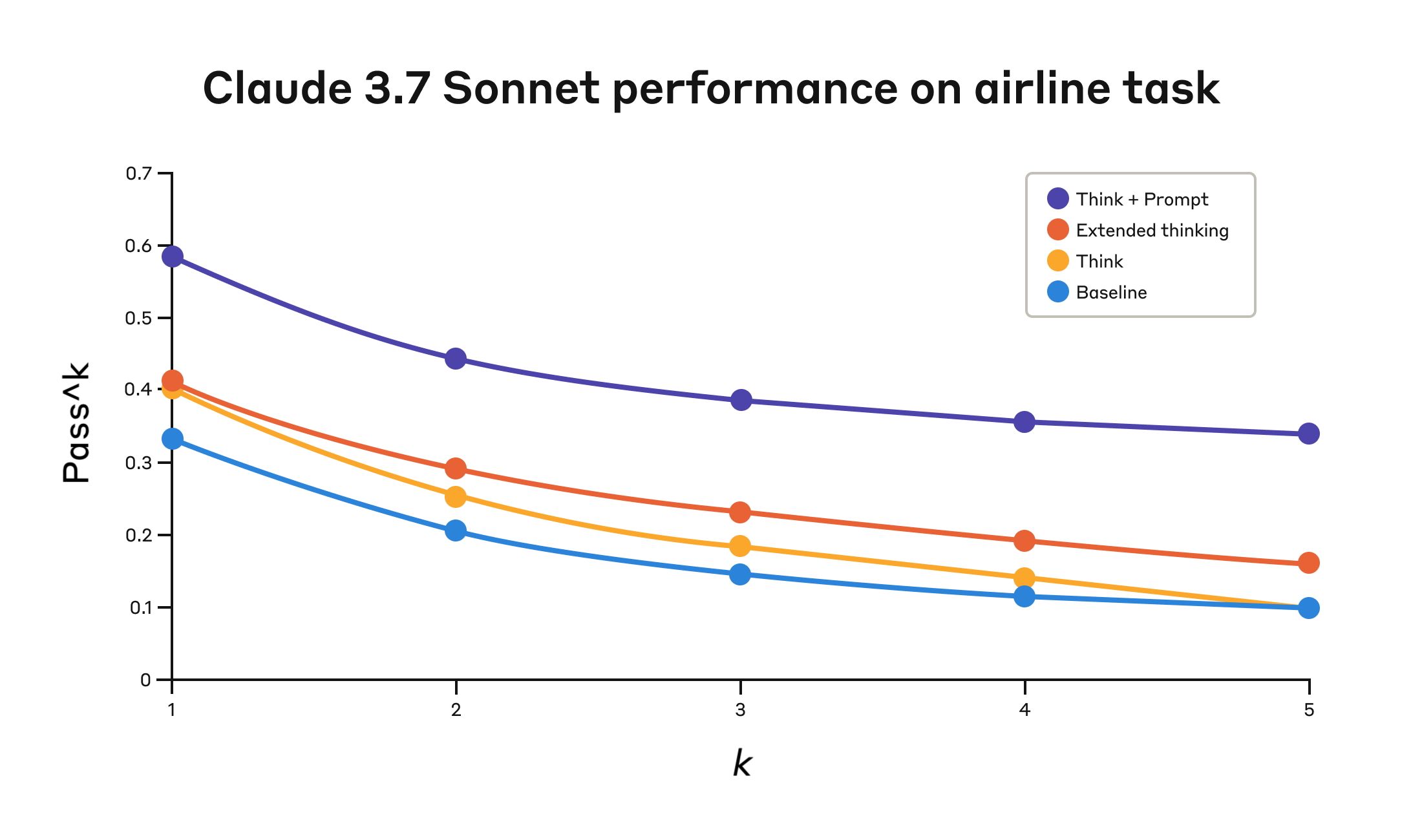
Claude 3.7 Sonnet's performance on the "airline" domain of the Tau-Bench eval under four different configurations.
Claude 3.7 Sonnet 在四种不同配置下,在 Tau-Bench 评测的 "airline" 领域上的表现。
Configuration
配置
k=1
k=1
k=2
k=2
k=3
k=3
k=4
k=4
k=5
k=5
"Think" + Prompt
"Think" + 提示词
0.584
0.584
0.444
0.444
0.384
0.384
0.356
0.356
0.340
0.340
"Think"
"Think"
0.404
0.404
0.254
0.254
0.186
0.186
0.140
0.140
0.100
0.100
Extended thinking
扩展思考
0.412
0.412
0.290
0.290
0.232
0.232
0.192
0.192
0.160
0.160
Baseline
基线
0.332
0.332
0.206
0.206
0.148
0.148
0.116
0.116
0.100
0.100
The best performance in the airline domain was achieved by pairing the “think” tool with an optimized prompt that gives examples of the type of reasoning approaches to use when analyzing customer requests.
在航空(airline)领域,最佳表现是通过将“think”工具与优化后的提示词搭配使用实现的,该提示词给出了在分析客户请求时可使用哪些类型推理方法的示例。
Below is an example of the optimized prompt:
以下是优化后的提示词示例:
## Using the think tool

Before taking any action or responding to the user after receiving tool results, use the think tool as a scratchpad to:
- List the specific rules that apply to the current request
- Check if all required information is collected
- Verify that the planned action complies with all policies
- Iterate over tool results for correctness

Here are some examples of what to iterate over inside the think tool:
<think_tool_example_1>
User wants to cancel flight ABC123
- Need to verify: user ID, reservation ID, reason
- Check cancellation rules:
  * Is it within 24h of booking?
  * If not, check ticket class and insurance
- Verify no segments flown or are in the past
- Plan: collect missing info, verify rules, get confirmation
</think_tool_example_1>

<think_tool_example_2>
User wants to book 3 tickets to NYC with 2 checked bags each
- Need user ID to check:
  * Membership tier for baggage allowance
  * Which payments methods exist in profile
- Baggage calculation:
  * Economy class × 3 passengers
  * If regular member: 1 free bag each → 3 extra bags = $150
  * If silver member: 2 free bags each → 0 extra bags = $0
  * If gold member: 3 free bags each → 0 extra bags = $0
- Payment rules to verify:
  * Max 1 travel certificate, 1 credit card, 3 gift cards
  * All payment methods must be in profile
  * Travel certificate remainder goes to waste
- Plan:
1. Get user ID
2. Verify membership level for bag fees
3. Check which payment methods in profile and if their combination is allowed
4. Calculate total: ticket price + any bag fees
5. Get explicit confirmation for booking
</think_tool_example_2>What's particularly interesting is how the different approaches compared.
特别有趣的是不同方法之间的比较结果。
Using the “think” tool with the optimized prompt achieved significantly better results over extended thinking mode (which showed similar performance to the unprompted “think” tool).
将“think”工具与优化后的提示词结合使用,比 extended thinking 模式取得了显著更好的结果(后者表现与未加提示的“think”工具相似)。
Using the "think" tool alone (without prompting) improved performance over baseline, but still fell short of the optimized approach.
单独使用“think”工具(不加提示)比基线提升了表现,但仍不及优化后的方法。
The combination of the "think" tool with optimized prompting delivered the strongest performance by a significant margin, likely due to the high complexity of the airline policy part of the benchmark, where the model benefitted the most from being given examples of how to “think.”
“think”工具与优化提示(optimized prompting)的结合以显著优势实现了最强表现,这很可能是因为该基准中航空政策部分的复杂性很高,模型从获得如何“思考”的示例中获益最大。
In the retail domain, we also tested various configurations to understand the specific impact of each approach
在零售(retail)领域,我们还测试了多种配置,以了解每种方法的具体影响
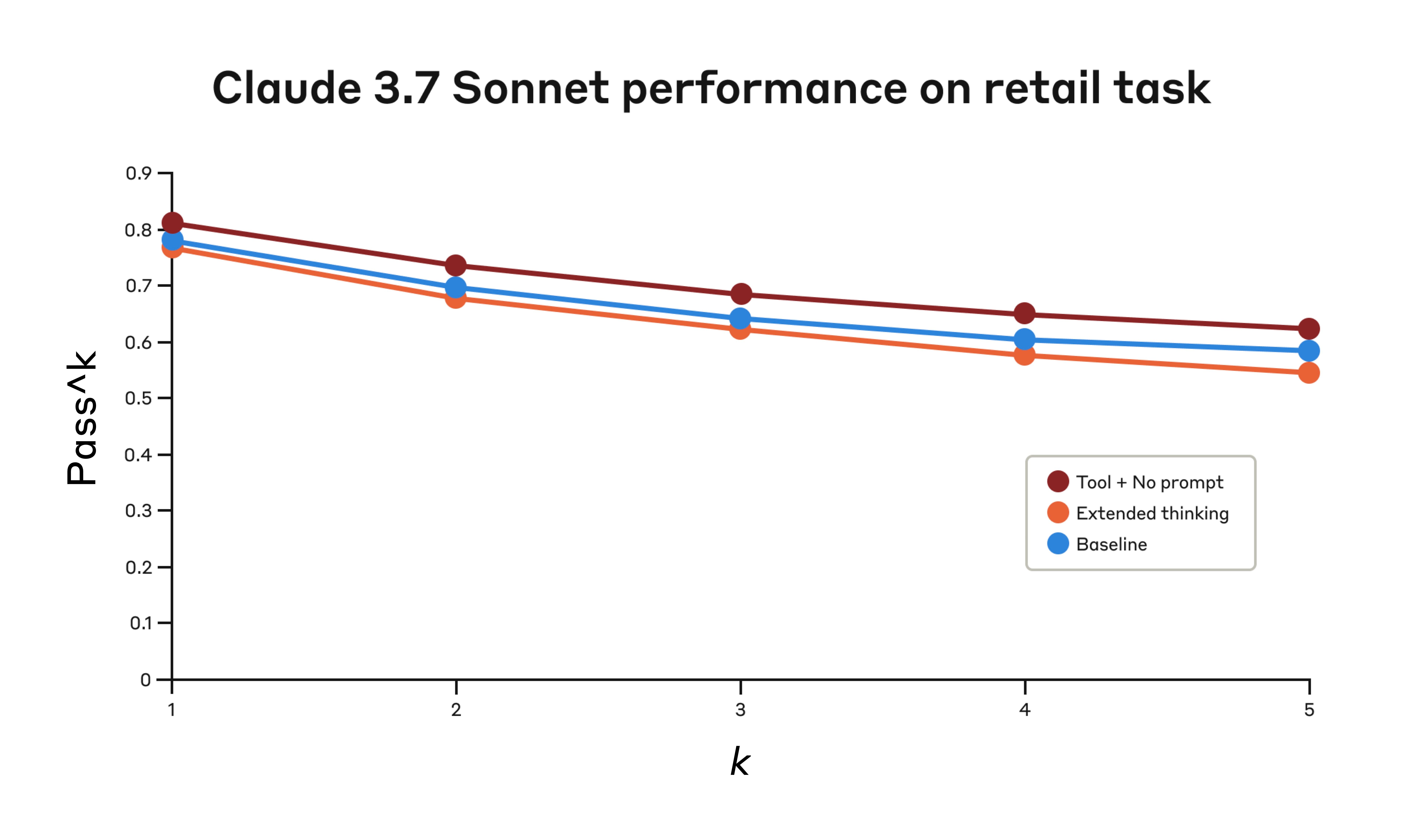
Performance of Claude 3.7 Sonnet on the "retail" domain of the Tau-Bench eval under three different configurations.
在三种不同配置下,Claude 3.7 Sonnet 在 Tau-Bench 评测(eval)的“retail”领域中的表现。
Configuration
配置
k=1
k=1
k=2
k=2
k=3
k=3
k=4
k=4
k=5
k=5
"Think" + no prompt
“Think” + 无提示词
0.812
0.812
0.735
0.735
0.685
0.685
0.650
0.650
0.626
0.626
Extended thinking
扩展思考
0.770
0.770
0.681
0.681
0.623
0.623
0.581
0.581
0.548
0.548
Baseline
基线
0.783
0.783
0.695
0.695
0.643
0.643
0.607
0.607
0.583
0.583
The "think" tool achieved the highest pass^1 score of 0.812 even without additional prompting.
“think” 工具即使没有额外提示词,也取得了最高的 pass^1 得分 0.812。
The retail policy is noticeably easier to navigate compared to the airline domain, and Claude was able to improve just by having a space to think without further guidance.
与 airline 领域相比,retail 策略明显更容易应对,而 Claude 仅靠获得思考空间,就能在无需进一步指导的情况下取得提升。
Key Insights from τ-Bench Analysis
来自 τ-Bench 分析的关键洞见
Our detailed analysis revealed several patterns that can help you implement the "think" tool effectively:
我们的详细分析揭示了几种模式,可以帮助你有效地实现“think”工具:
Prompting matters significantly on difficult domains.
在困难领域,提示词设计至关重要。
Simply making the "think" tool available might improve performance somewhat, but pairing it with optimized prompting yielded dramatically better results for difficult domains.
仅仅提供“think”工具可能会在一定程度上提升性能,但将其与优化提示词结合,在困难领域能带来显著更好的结果。
However, easier domains may benefit from simply having access to “think.”
然而,对于较简单的领域,仅仅能够访问“think”就可能带来好处。
Improved consistency across trials.
多次试验中的一致性得到提升。
The improvements from using “think” were maintained for pass^k up to k=5, indicating that the tool helped Claude handle edge cases and unusual scenarios more effectively.
使用“think”带来的改进在 pass^k 直至 k=5 时仍得以保持,表明该工具有助于 Claude 更有效地处理边缘情况(edge cases)和不寻常场景。
Performance on SWE-Bench
在 SWE-Bench 上的性能
A similar “think” tool was added to our SWE-bench setup when evaluating Claude 3.7 Sonnet, contributing to the achieved state-of-the-art score of 0.623.
在评估 Claude 3.7 Sonnet 时,一个类似的“think”工具被添加到了我们的 SWE-bench 设置中,从而实现了 0.623 的最先进分数。
The adapted “think” tool definition is given below:
改编后的“think”工具定义如下:
{
  "name": "think",
  "description": "Use the tool to think about something. It will not obtain new information or make any changes to the repository, but just log the thought. Use it when complex reasoning or brainstorming is needed. For example, if you explore the repo and discover the source of a bug, call this tool to brainstorm several unique ways of fixing the bug, and assess which change(s) are likely to be simplest and most effective. Alternatively, if you receive some test results, call this tool to brainstorm ways to fix the failing tests.",
  "input_schema": {
    "type": "object",
    "properties": {
      "thought": {
        "type": "string",
        "description": "Your thoughts."
      }
    },
    "required": ["thought"]
  }
}Our experiments (n=30 samples with "think" tool, n=144 samples without) showed the isolated effects of including this tool improved performance by 1.6% on average (Welch's t-test: t(38.89) = 6.71, p < .001, d = 1.47).
我们的实验(使用“think”工具的 n=30 个样本,未使用的 n=144 个样本)表明,包含该工具的独立效应平均将性能提升了 1.6%(Welch's t 检验:t(38.89) = 6.71,p < .001,d = 1.47)。
When to use the "think" tool
何时使用“think”工具
Based on these evaluation results, we've identified specific scenarios where Claude benefits most from the "think" tool:
基于这些评测结果,我们确定了 Claude 从“think”工具中获益最多的具体场景:
Tool output analysis.
工具输出分析。
When Claude needs to carefully process the output of previous tool calls before acting and might need to backtrack in its approach;
当 Claude 需要在实际操作前仔细处理之前工具调用的输出,并且可能需要回溯其方法时;
Policy-heavy environments.
策略繁重的环境。
When Claude needs to follow detailed guidelines and verify compliance; and
当 Claude 需要遵循详细的指导方针并验证合规性时;以及
Sequential decision making.
顺序决策。
When each action builds on previous ones and mistakes are costly (often found in multi-step domains).
当每个动作都建立在先前动作之上,且错误代价高昂时(常见于多步骤领域)。
Implementation best practices
实现最佳实践
To get the most out of the "think" tool with Claude, we recommend the following implementation practices based on our τ-bench experiments.
为了在 Claude 中充分利用“think”工具,我们基于 τ-bench 实验推荐以下实现实践。
1. Strategic prompting with domain-specific examples
1. 使用领域特定示例进行策略性提示
The most effective approach is to provide clear instructions on when and how to use the "think" tool, such as the one used for the τ-bench airline domain.
最有效的方法是提供关于何时以及如何使用“think”工具的清晰指令,例如用于 τ-bench airline 领域的那类指令。
Providing examples tailored to your specific use case significantly improves how effectively the model uses the "think" tool:
提供针对你特定用例定制的示例,会显著提升模型使用“think”工具的有效性:
The level of detail expected in the reasoning process;
推理过程中期望的详细程度;
How to break down complex instructions into actionable steps;
如何将复杂指令拆解为可操作步骤;
Decision trees for handling common scenarios; and
处理常见场景的决策树;以及
How to check if all necessary information has been collected.
如何检查是否已收集所有必要信息。
2. Place complex guidance in the system prompt
2. 将复杂指导放在系统提示词(system prompt)中
We found that, when they were long and/or complex, including instructions about the "think" tool in the system prompt was more effective than placing them in the tool description itself.
我们发现,当这些指令冗长和/或复杂时,将有关“think”工具的指令包含在系统提示词中,比将它们放在工具描述本身中更有效。
This approach provides broader context and helps the model better integrate the thinking process into its overall behavior.
这种方法提供更广泛的上下文,并帮助模型更好地将思考过程整合到其整体行为中。
When not to use the "think" tool
何时不使用“think”工具
Whereas the “think” tool can offer substantial improvements, it is not applicable to all tool use use cases, and does come at the cost of increased prompt length and output tokens.
尽管“think”工具可以带来显著改进,但它并不适用于所有工具调用(tool use)用例,而且确实会以提示词长度和输出 token 增加为代价。
Specifically, we have found the “think” tool does not offer any improvements in the following use cases:
具体来说,我们发现“think”工具在以下用例中不会带来任何改进:
Non-sequential tool calls.
非顺序工具调用。
If Claude only needs to make a single tool call or multiple parallel calls to complete a task, there is unlikely to be any improvements from adding in “think.”
如果 Claude 只需要进行一次工具调用或多次并行调用来完成任务,那么加入“think”不太可能带来任何改进。
Simple instruction following.
简单的指令遵循。
When there are not many constraints to which Claude needs to adhere, and its default behaviour is good enough, there are unlikely to be gains from additional “think”-ing.
当 Claude 需要遵循的约束不多,且其默认行为已经足够好时,额外的“think”不太可能带来收益。
Getting started
开始使用
The "think" tool is a straightforward addition to your Claude implementation that can yield meaningful improvements in just a few steps:
“think”工具是对你的 Claude 实现的一个简单补充,只需几步就能带来有意义的改进:
Test with agentic tool use scenarios.
用智能体工具调用场景进行测试。
Start with challenging use cases—ones where Claude currently struggles with policy compliance or complex reasoning in long tool call chains.
从具有挑战性的用例开始——这些用例正是 Claude 目前在策略合规或长工具调用链中的复杂推理方面表现不佳的地方。
Add the tool definition.
添加工具定义。
Implement a "think" tool customized to your domain.
实现一个针对你的领域定制的“think”工具。
It requires minimal code but enables more structured reasoning.
它只需要极少的代码,却能实现更有结构的推理。
Also consider including instructions on when and how to use the tool, with examples relevant to your domain to the system prompt.
还要考虑将关于何时以及如何使用该工具的说明,连同与你的领域相关的示例,加入 system prompt。
Monitor and refine.
监控并优化。
Watch how Claude uses the tool in practice, and adjust your prompts to encourage more effective thinking patterns.
观察 Claude 在实践中如何使用该工具,并调整你的提示词以鼓励更有效的思考模式。
The best part is that adding this tool has minimal downside in terms of performance outcomes.
最好的部分是,添加这个工具在性能结果方面的负面影响极小。
It doesn't change external behavior unless Claude decides to use it, and doesn't interfere with your existing tools or workflows.
除非 Claude 决定使用它,否则它不会改变外部行为,也不会干扰你现有的工具或工作流。
Conclusion
结论
Our research has demonstrated that the "think" tool can significantly enhance Claude 3.7 Sonnet's performance1 on complex tasks requiring policy adherence and reasoning in long chains of tool calls.
我们的研究表明,“think”工具可以显著提升 Claude 3.7 Sonnet 在需要策略遵循(policy adherence)和长链工具调用推理的复杂任务上的性能1。
“Think” is not a one-size-fits-all solution, but it offers substantial benefits for the correct use cases, all with minimal implementation complexity.
“Think”不是万能的解决方案,但对于正确的用例,它提供了实质性的好处,而且实现复杂度极低。
We look forward to seeing how you'll use the "think" tool to build more capable, reliable, and transparent AI systems with Claude.
我们期待看到你如何使用“think”工具与 Claude 一起构建更强大、更可靠、更透明的 AI 系统。