超越权限提示:让 Claude Code 更安全、更自主
Beyond permission prompts: making Claude Code more secure and autonomous
文章目录
In Claude Code, Claude writes, tests, and debugs code alongside you, navigating your codebase, editing multiple files, and running commands to verify its work.
在 Claude Code 中,Claude 与你并肩编写、测试和调试代码,浏览你的代码库、编辑多个文件,并运行命令来验证其工作。
Giving Claude this much access to your codebase and files can introduce risks, especially in the case of prompt injection.
让 Claude 对你的代码库和文件拥有如此大的访问权限可能会带来风险,尤其是在提示词注入(prompt injection)的情况下。
To help address this, we’ve introduced two new features in Claude Code built on top of sandboxing, both of which are designed to provide a more secure place for developers to work, while also allowing Claude to run more autonomously and with fewer permission prompts.
为了帮助解决这个问题,我们在 Claude Code 中引入了两项基于沙箱(sandboxing)构建的新功能,这两项功能都旨在为开发者提供更安全的工作环境,同时让 Claude 能够更自主地运行,并且减少权限提示(permission prompts)。
In our internal usage, we've found that sandboxing safely reduces permission prompts by 84%.
在我们的内部使用中,我们发现沙箱化可以安全地将权限提示减少 84%。
By defining set boundaries within which Claude can work freely, they increase security and agency.
通过定义让 Claude 可以自由工作的固定边界,它们提高了安全性和自主性。
Keeping users secure on Claude Code
确保用户在 Claude Code 上的安全
Claude Code runs on a permission-based model: by default, it's read-only, which means it asks for permission before making modifications or running any commands.
Claude Code 运行在基于权限的模型上:默认情况下,它是只读的,这意味着它在进行修改或运行任何命令之前会请求权限。
There are some exceptions to this: we auto-allow safe commands like echo or cat, but most operations still need explicit approval.
对此有一些例外:我们会自动允许 echo 或 cat 等安全命令,但大多数操作仍然需要明确批准。
Constantly clicking "approve" slows down development cycles and can lead to ‘approval fatigue’, where users might not pay close attention to what they're approving, and in turn making development less safe.
不断点击“批准”会拖慢开发周期,并可能导致“批准疲劳”,即用户可能不会密切关注他们正在批准的内容,进而使开发变得不那么安全。
To address this, we launched sandboxing for Claude Code.
为了解决这个问题,我们为 Claude Code 推出了沙箱功能。
Sandboxing: a safer and more autonomous approach
沙箱机制:更安全、更自主的方法
Sandboxing creates pre-defined boundaries within which Claude can work more freely, instead of asking for permission for each action.
沙箱机制创建预定义边界,Claude 可以在这些边界内更自由地工作,而不必为每个操作请求权限。
With sandboxing enabled, you get drastically fewer permission prompts and increased safety.
启用沙箱机制后,权限提示会大幅减少,安全性也会提升。
Our approach to sandboxing is built on top of operating system-level features to enable two boundaries:
我们的沙箱方法构建在操作系统级功能之上,以实现两类边界:
Filesystem isolation, which ensures that Claude can only access or modify specific directories.
文件系统隔离,确保 Claude 只能访问或修改特定目录。
This is particularly important in preventing a prompt-injected Claude from modifying sensitive system files.
这一点对于防止被提示词注入的 Claude 修改敏感系统文件尤为重要。
Network isolation, which ensures that Claude can only connect to approved servers.
网络隔离,确保 Claude 只能连接到已批准的服务器。
This prevents a prompt-injected Claude from leaking sensitive information or downloading malware.
这可以防止被提示词注入的 Claude 泄露敏感信息或下载恶意软件。
It is worth noting that effective sandboxing requires both filesystem and network isolation.
值得注意的是,有效的沙箱机制需要同时具备文件系统隔离和网络隔离。
Without network isolation, a compromised agent could exfiltrate sensitive files like SSH keys; without filesystem isolation, a compromised agent could easily escape the sandbox and gain network access.
如果没有网络隔离,被攻陷的智能体(agent)可能会窃取 SSH 密钥等敏感文件;如果没有文件系统隔离,被攻陷的智能体可能轻易逃出沙箱并获得网络访问权限。
It’s by using both techniques that we can provide a safer and faster agentic experience for Claude Code users.
正是通过同时使用这两种技术,我们才能为 Claude Code 用户提供更安全、更快速的智能体体验。
Two new sandboxing features in Claude Code
Claude Code 中的两项新沙箱功能
Sandboxed bash tool: safe bash execution without permission prompts
沙箱化的 bash 工具:无需权限提示即可安全执行 bash
We're introducing a new sandbox runtime, available in beta as a research preview, that lets you define exactly which directories and network hosts your agent can access, without the overhead of spinning up and managing a container.
我们推出了一款新的沙箱运行时(sandbox runtime),以 beta 形式作为研究预览(research preview)提供,它让你可以精确指定智能体能够访问哪些目录和网络主机,而无需承担启动和管理容器的开销。
This can be used to sandbox arbitrary processes, agents and MCP servers.
它可用于沙箱化任意进程、智能体和 MCP 服务器。
It is also available as an open source research preview.
它也以开源研究预览的形式提供。
In Claude Code, we use this runtime to sandbox the bash tool, which allows Claude to run commands within the defined limits you set.
在 Claude Code 中,我们用这个运行时来沙箱化 bash 工具,让 Claude 能在你设定的限定范围内运行命令。
Inside the safe sandbox, Claude can run more autonomously and safely execute commands without permission prompts.
在安全的沙箱内,Claude 可以更自主地运行,并在无需权限提示的情况下安全执行命令。
If Claude tries to access something outside of the sandbox, you'll be notified immediately, and can choose whether or not to allow it.
如果 Claude 试图访问沙箱之外的资源,你会立即收到通知,并可选择是否允许。
We’ve built this on top of OS level primitives such as Linux bubblewrap and MacOS seatbelt to enforce these restrictions at the OS level.
我们基于 Linux bubblewrap 和 MacOS seatbelt 等操作系统级原语构建了它,以在操作系统层面强制执行这些限制。
They cover not just Claude Code's direct interactions, but also any scripts, programs, or subprocesses that are spawned by the command.As described above, this sandbox enforces both:
它们不仅覆盖 Claude Code 的直接交互,也覆盖由该命令启动的任何脚本、程序或子进程。如上所述,这个沙箱同时强制执行以下两项:
Filesystem isolation, by allowing read and write access to the current working directory, but blocking the modification of any files outside of it.
文件系统隔离(filesystem isolation):允许对当前工作目录进行读写访问,但阻止修改其范围之外的任何文件。
Network isolation, by only allowing internet access through a unix domain socket connected to a proxy server running outside the sandbox.
网络隔离,仅允许通过一个连接到运行在沙箱外部的代理服务器(proxy server)的 unix domain socket 来访问互联网。
This proxy server enforces restrictions on the domains that a process can connect to, and handles user confirmation for newly requested domains.
该代理服务器对进程可以连接的域名实施限制,并处理对新请求域名的用户确认。
And if you’d like further-increased security, we also support customizing this proxy to enforce arbitrary rules on outgoing traffic.
如果你希望进一步提高安全性,我们还支持自定义此代理,以对出站流量实施任意规则。
Both components are configurable: you can easily choose to allow or disallow specific file paths or domains.
这两个组件均可配置:你可以轻松选择允许或禁止特定的文件路径或域名。
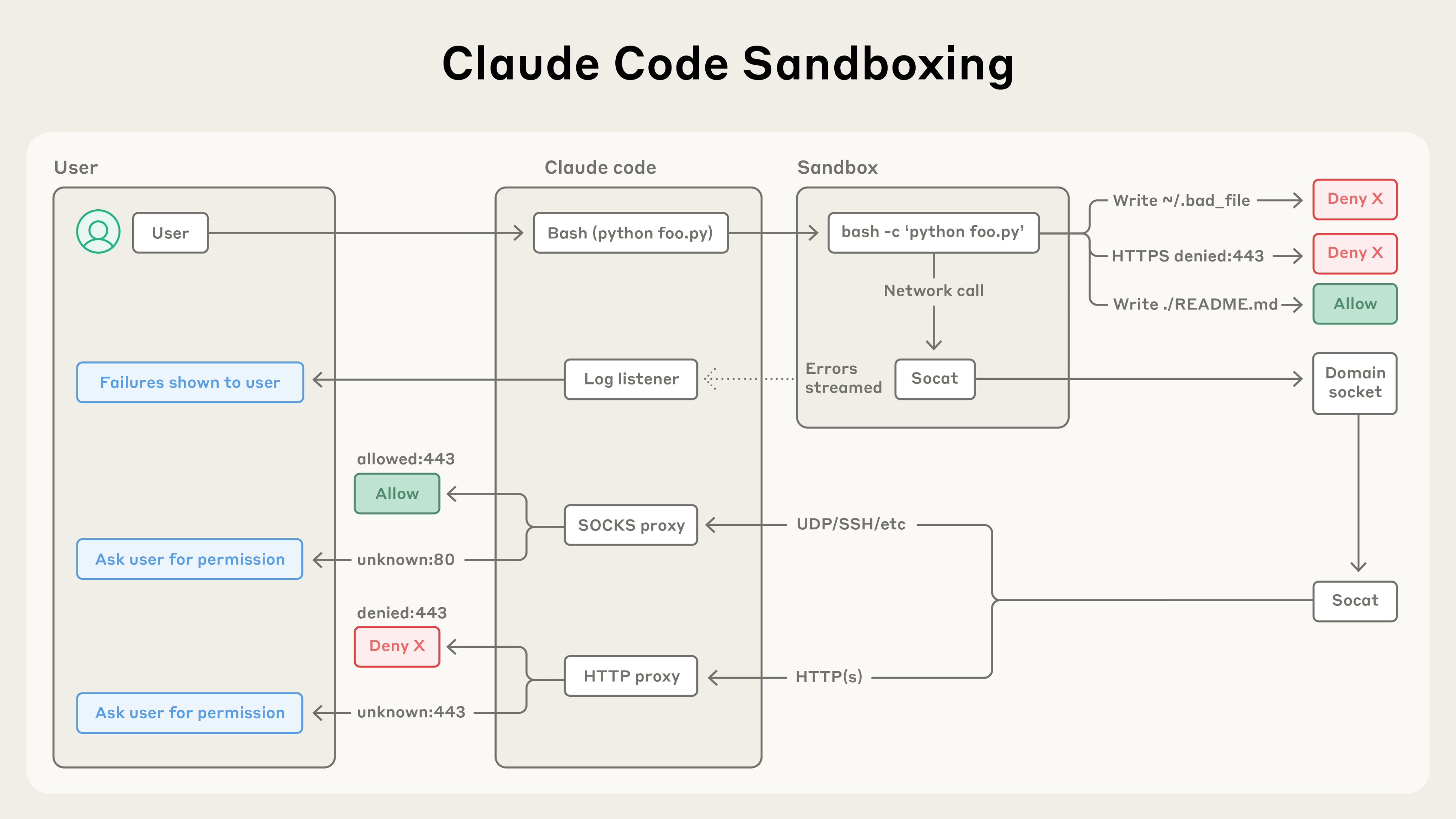
Claude Code's sandboxing architecture isolates code execution with filesystem and network controls, automatically allowing safe operations, blocking malicious ones, and asking permission only when needed.
Claude Code 的沙箱架构通过文件系统和网络控制来隔离代码执行,自动允许安全操作、阻止恶意操作,并仅在需要时请求许可。
Sandboxing ensures that even a successful prompt injection is fully isolated, and cannot impact overall user security.
沙箱化确保即使一次成功的提示词注入也完全被隔离,无法影响用户的整体安全。
This way, a compromised Claude Code can't steal your SSH keys, or phone home to an attacker's server.
这样一来,被攻陷的 Claude Code 无法窃取你的 SSH 密钥,也无法回连到攻击者的服务器。
To get started with this feature, run /sandbox in Claude Code and check out more technical details about our security model.
要开始使用此功能,请在 Claude Code 中运行 /sandbox,并查看关于我们安全模型的更多技术细节。
To make it easier for other teams to build safer agents, we have open sourced this feature.
为了让其他团队更容易构建更安全的智能体,我们已将这一功能开源。
We believe that others should consider adopting this technology for their own agents in order to enhance the security posture of their agents.
我们认为,其他人应考虑为其自有智能体采用这项技术,以增强其智能体的安全态势。
Claude Code on the web: running Claude Code securely in the cloud
Claude Code on the web:在云端安全运行 Claude Code
Today, we're also releasing Claude Code on the web enabling users to run Claude Code in an isolated sandbox in the cloud.
今天,我们还发布了 Claude Code on the web,让用户能够在云端的隔离沙箱中运行 Claude Code。
Claude Code on the web executes each Claude Code session in an isolated sandbox where it has full access to its server in a safe and secure way.
Claude Code on the web 会在隔离沙箱中执行每个 Claude Code 会话,在其中以安全可靠的方式对其服务器拥有完整访问权限。
We've designed this sandbox to ensure that sensitive credentials (such as git credentials or signing keys) are never inside the sandbox with Claude Code.
我们设计这个沙箱的目的,是确保敏感凭据(例如 git 凭据或签名密钥)绝不会与 Claude Code 一同位于沙箱内部。
This way, even if the code running in the sandbox is compromised, the user is kept safe from further harm.
这样,即使沙箱中运行的代码被攻陷,用户也能免受进一步伤害。
Claude Code on the web uses a custom proxy service that transparently handles all git interactions.
Claude Code on the web 使用一个自定义代理服务,透明地处理所有 git 交互。
Inside the sandbox, the git client authenticates to this service with a custom-built scoped credential.
在沙箱内部,git 客户端使用一个专门构建的、限定作用域的凭据向该服务进行认证。
The proxy verifies this credential and the contents of the git interaction (e.g. ensuring it is only pushing to the configured branch), then attaches the right authentication token before sending the request to GitHub.
代理会验证该凭据以及 git 交互的内容(例如确保它只推送到配置的分支),然后在把请求发送到 GitHub 之前附加正确的认证 token。
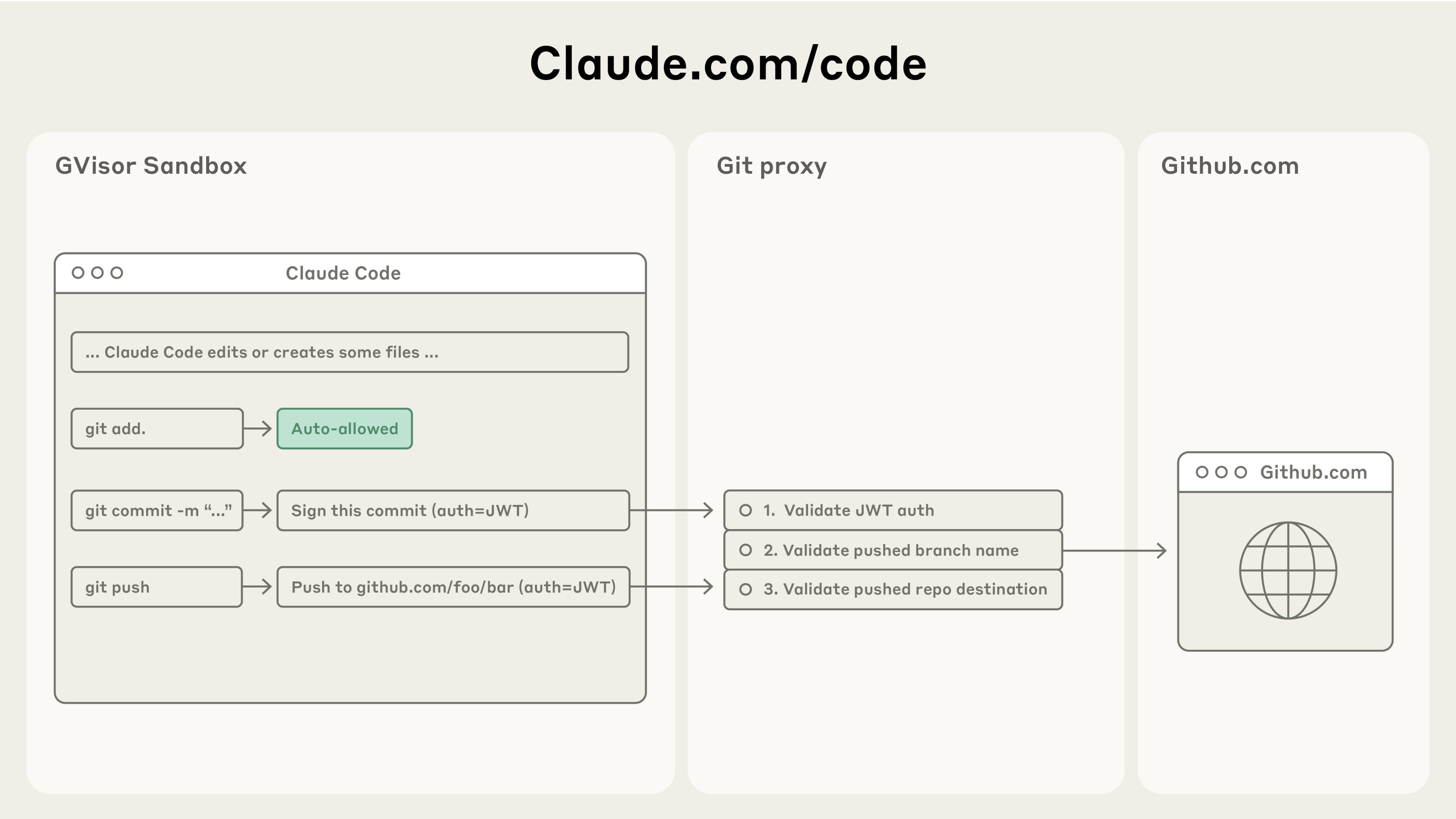
Claude Code's Git integration routes commands through a secure proxy that validates authentication tokens, branch names, and repository destinations—allowing safe version control workflows while preventing unauthorized pushes.
Claude Code 的 Git 集成会让命令经过一个安全代理,由它校验认证 token、分支名称和仓库目标——从而在阻止未授权推送的同时,支持安全的版本控制工作流。
Getting started
开始使用
Our new sandboxed bash tool and Claude Code on the web offer substantial improvements in both security and productivity for developers using Claude for their engineering work.
我们新的沙箱化 bash 工具和 Claude Code on the web,为使用 Claude 开展工程工作的开发者带来了安全性和生产力上的显著提升。
To get started with these tools:
要开始使用这些工具:
Run /sandbox in Claude and check out our docs on how to configure this sandbox.
在 Claude 中运行 /sandbox,并查看我们关于如何配置该沙箱的文档。
Go to claude.com/code to try out Claude Code on the web.
前往 claude.com/code 试用 Claude Code on the web。
Or, if you're building your own agents, check out our open-sourced sandboxing code, and consider integrating it into your work.
或者,如果你正在构建自己的智能体,请查看我们开源的沙箱代码,并考虑将其集成到你的工作中。
We look forward to seeing what you build.
我们期待看到你构建出的成果。
To learn more about Claude Code on the web, check out our launch blog post.
要了解关于 Claude Code on the web 的更多信息,请查看我们的发布博客文章。
Acknowledgements
致谢
Article written by David Dworken and Oliver Weller-Davies, with contributions from Meaghan Choi, Catherine Wu, Molly Vorwerck, Alex Isken, Kier Bradwell, and Kevin Garcia
本文由 David Dworken 和 Oliver Weller-Davies 撰写,Meaghan Choi、Catherine Wu、Molly Vorwerck、Alex Isken、Kier Bradwell 和 Kevin Garcia 亦有贡献。